
Summarize this blog post with:
You run an email marketing campaign and open the dashboard. Opens are higher than usual. Clicks look healthy, too.
It is easy to read this progress. You start pulling your report together.
As you flow downstream, you check conversions. They’re significantly lower than expected.
Now the numbers don’t align. The same campaign shows strong engagement and weak outcomes at the same time.
At this point, the issue is that the metrics aren’t giving you a clear answer. You’re left figuring out which signals to trust and what they actually mean for your business.
In this article, we’ll categorize the email marketing metrics to measure performance right from reaching the inbox to driving revenue and repeat engagement. Plus, you’ll also discover how Two Minute Reports helps you create an actionable email marketing dashboard to centralize and automate campaign performance.
What Do Your Email Marketing Metrics Actually Tell You?
The confusion usually comes from treating email marketing metrics as a flat list – a set of numbers that all speak to the same thing. They don’t.
Each metric has one specific job. It answers one question about each stage of your email’s journey. Open rate measures whether your subject line earned a click. Conversion rate is about measuring whether the whole campaign was held together successfully.
When you read them as a list, the numbers compete. When you read them as a sequence, they point you towards a direction.
That sequence moves in four stages:
- Reach – Did the email land in the inbox? (eg: deliverability, bounce rate)
- Attention – Did it earn an open and a click? (eg: open rate, CTR, CTOR)
- Outcome – Did it drive a result? (eg: conversion rate, revenue per recipient)
- Sustainability – Is the list healthy enough to keep performing? (eg: unsubscribes, list growth, spam rate)
A problem at any stage breaks everything after it. Strong attention metrics mean nothing when the reach is failing. Strong outcomes don’t last if the list health is declining.
That’s the structure we’ll use to break down each metric in the next section – what it measures, which stage it belongs to and how to optimize it for growth.
Top Email Marketing Metrics To Measure Your Campaign Performance
In this section, let me take you through the most important email marketing metrics that cover the four different stages: reach, attention, outcome, and sustainability. Here’s how:
Reach – Did the email land in the inbox?
Reach is the entry point of email marketing performance. If reach breaks, every downstream metric becomes misleading. That’s why this stage is about delivery quality and inbox placement.
1. Deliverability Rate
What it is: The percentage of emails that successfully landed in your recipient's inbox. A high deliverability rate of above 90% is considered the best, indicating a clean list and optimized workflow.
How to calculate: Deliverability Rate = (Delivered Emails / Emails Sent) x 100
Why it matters: This is the baseline for measuring performance. A high send volume means nothing if emails aren’t being accepted by inbox providers. Poor deliverability compresses your audience reach before engagement even begins.
How to optimize:
- Segment inactive users before sending: Regularly exclude subscribers who haven’t engaged in 60-90 days. ISPs weigh recent engagement signals to determine user interaction.
- Warm up domains/IPs gradually: Sudden spikes in volume from a new or inactive sending domain reduce trust.
- Align sending patterns: Maintain consistent volume and frequency; erratic spikes trigger filtering.
- Authenticate SPF, DKIM, DMARC: Missing or misaligned authentication directly impacts acceptance rates.
2. Bounce Rate (Hard & Soft)
What it is: The percentage of emails that failed to reach the recipient's inbox.
- Hard bounce: permanent failure (invalid, non-existent domain).
- Soft bounce: temporary failure (server issue, flooded inbox)
Benchmark: A good email bounce rate is under 2%, while rates above 5% signal serious deliverability issues.
How to calculate: Bounce Rate: (Bounced emails / Emails sent) x 100
Why it matters: Bounce rate is a direct signal of list quality and sending reputation. High hard bounces damage sender credibility, while repeated soft bounces can indicate throttling (limiting email delivery speed) or reputation issues.
How to optimize:
- Avoid purchased or scraped lists: These consistently produce high hard bounce rates and blacklist risks.
- Use double-opt-in for new subscribers: Reduces fake or mistyped emails at the source.
- Retry logic for soft bounces: Configure your email service provider to retry delivery over time instead of immediate drop-offs.
3. Inbox Placement Rate
What it is: The percentage of delivered emails that land in the primary inbox, not in the spam or promotions.
How to calculate: Inbox Placement Rate: (Emails delivered to inbox / Emails delivered) x 100
Why it matters: An email marked as delivered may still be filtered into spam or low-visibility tabs. This metric determines whether your emails are actually seen by your target users.
How to optimize:
- Drive consistent engagement signals: ISPs prioritize senders whose emails are opened, clicked and replied to.
- Avoid spam-triggering patterns: Excessive use of promotional language, misleading subject lines or inconsistent sender identity will impact the placement rates.
- Maintain list hygiene: Disengaged users increase the likelihood of spam filtering.
Attention – Did the Email Earn an Open and a Click?
This stage shows whether your email earned enough interest to move forward in the funnel.
4. Open Rate
What it is: The percentage of delivered emails that were opened.
How to calculate: Open Rate: (Unique opens/ Delivered emails) x 100
Benchmark: The average email open rate in 2025 was 43.46%. This was a slight increase on 2024’s average open rate of 42.35%.
Why it matters: It indicates whether your email was compelling enough to be opened, influenced by the subject line, sender name and timing.
How to optimize:
- Align subject line with audience intent: Avoid curiosity gaps that don’t match content.
- Use consistent sender identity: Recognizable “from name” improves trust and repeat opens.
- Optimize send time by cohort: Analyze when specific segments engage, not just the overall best time.
5. Click-Through Rate
What it is: The percentage of delivered emails that generated at least one click.
How to calculate: CTR: (Unique clicks / Delivered emails) x 100
Why it matters: CTR measures the overall engagement. It tells you how many recipients found the email relevant enough to take action.
How to optimize:
- Reduce cognitive load: One primary CTA per email performs better than multiple competing actions.
- Position CTAs clearly: Above the fold placement captures high-intent users.
- Use behavioral segmentation: Tailor content based on past clicks or interactions.
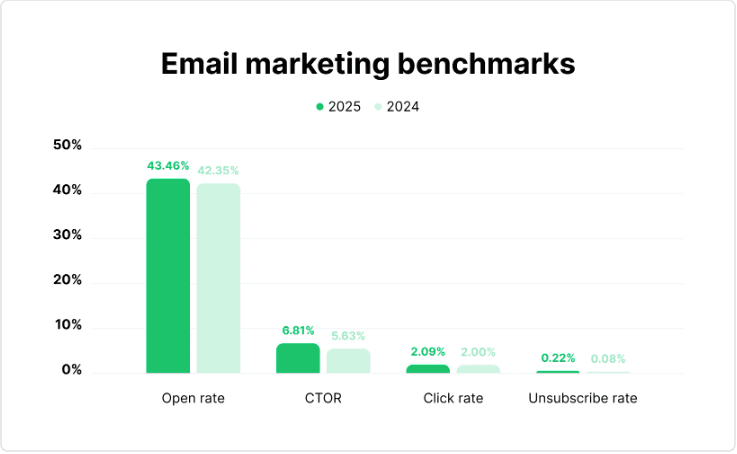
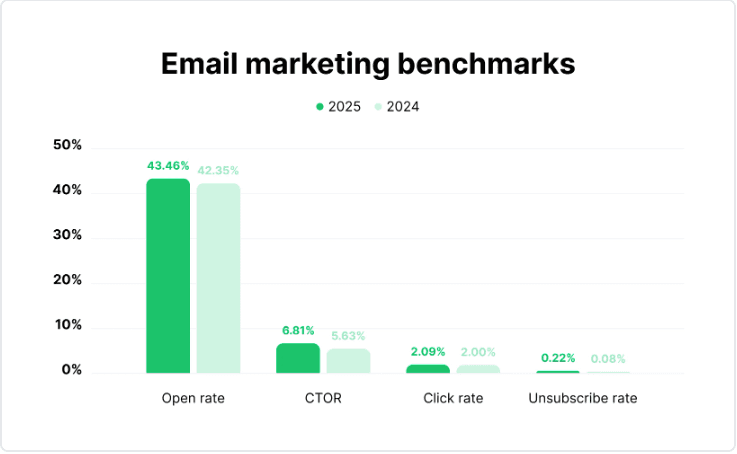 Image Source: Mailerlite
6. Click-to-Open Rate (CTOR)
What it is: The percentage of users who clicked after opening the email.
How to calculate: CTOR: (Unique clicks / Unique opens) x 100
Why it matters: CTOR measures your email content effectiveness – design, copy and CTA by analyzing those who opened it. A high CTOR ensures your content is compelling, whereas a low CTOR signals whether it is the content or the offer problem.
How to optimize:
- Ensure message continuity: The email body should directly follow the subject line promise.
- Tighten content hierarchy: Clearly prioritize one message and one call-to-action.
- Improve visual consistency: Use clear headings, spacing, and CTA contrast.
- Test content formats: Use A/B testing to identify the best-performing content formats to encourage customer behaviour.
Outcome – Did the Email Drive a Result?
This stage answers the only question that matters: Did the email lead to a meaningful action?
7. Conversion Rate
What it is: The percentage of recipients who completed the desired action, such as purchase, signup, demo, etc.
How to calculate: Conversion rate: (Number of conversions/ Total number of emails delivered) x 100
Why it matters: This is where engagement turns into outcomes. A strong conversion rate indicates that the email set the right expectation for the user to fulfil their goal.
Benchmark: According to Mailchimp, a good conversion rate falls between 2% and 5% across all industries, though results vary significantly based on what you’re measuring and your industry type.
How to optimize:
- Reduce steps post-click: Fewer form fields, fewer distractions lead to higher completion rates.
- Segment by intent, not just demographics: Create tailored conversion paths to segmented users to align their intent with the offer.
- Audit mobile experience first: Since most email clicks are mobile, optimize landing pages to load faster.
8. Revenue Per Recipient
What it is: The average revenue generated per email sent.
How to calculate: Revenue per Recipient: Total Revenue / Emails Delivered
Why it matters: RPR connects email performance directly to a business impact. It balances both engagement and conversion, making it one of the most reliable metrics to evaluate campaigns.
How to optimize:
- Prioritize high-intent segments: Interested prospects, repeat buyers, or active users drive more revenue.
- Optimize offer structure, not just messaging: Bundles, thresholds, or limited-time incentives impact RPR more than copy tweaks.
- Test campaign vs flow performance: Automated email flows (welcome, abandoned cart) typically yield high RPR, so scale what works.
9. Email-driven Average Order Value
What it is: The average value of orders generated through email campaigns.
How to calculate: AOV: Revenue from email / Number of orders from email
Why it matters: AOV helps you understand whether you drive high-quality purchases, rather than generating only revenue.
How to optimize:
- Leverage timing: Upsell emails tend to perform better after purchase when the intent is high.
- Position premium options: Anchor high-value choices before CTA.
- Promote bundles or complementary products: Especially in cross-sells or post-purchase emails.
Sustainability – Can Your Email Performance Hold Over Time?
This stage answers a different kind of question: Are you maintaining a list that can keep generating results consistently?
10. Unsubscribe Rate
What it is: The percentage of recipients who opt out after receiving an email.
How to calculate: Unsubscribe rate: (Unsubscribes / Delivered emails) x 100
Why it matters: Unsubscribes indicate content or frequency mismatch. A rising unsubscribe rate signals that emails are no longer aligning with subscriber expectations.
How to optimize:
- Align frequency with engagement: Send less frequently to low-engagement segments.
- Set expectations at signup: Clearly communicate what users will receive and how often.
- Audit campaign intent: Frequent promotions without value-driven emails increase opt-outs.
11. Spam Complaint Rate
What it is: The percentage of recipients who mark your email as spam.
How to calculate: Spam Complaint Rate: (Spam complaints / Delivered Emails) x 100
Why it matters: This is one of the strongest negative signals for sender reputation. Even a small increase can impact deliverability across future campaigns.
How to optimize:
- Target only engaged users: Clean up your list to stop sending to inactive users.
- Avoid misleading subject lines: Mismatch between subject lines and content leads to frustration.
- Make unsubscribe easy to find: Users will mark your emails as spam if they can’t easily opt out.
12. List Growth Rate
What it is: The net rate at which your email list is growing over time.
How to calculate: List Growth Rate: [(New subscribers – Unsubscribes – Bounces) / Total Subscribers] x 100
Why it matters: A growing list with low engagement or high churn isn’t sustainable; it increases cost without improving outcomes.
How to optimize:
- Track source quality, not volume: Prioritize channels that drive engaged subscribers.
- Align acquisition offers with long-term value: Misleading or clickbait offers increase churn and break trust.
- Monitor cohort retention: Evaluate how new subscribers behave after 30-60 days.
Pro tip: A growing list means little if the quality drops. The source of your subscribers, like how they found you and why they signed up, directly shapes long-term engagement. Gavin Hewitson explains why list quality starts with targeted acquisition, structured signup flows and using zero-party data.


Now that you understand how to analyze your key metrics, next, let’s see how to build a custom email marketing dashboard to centralize performance insights using Two Minute Reports.
How To Create an Email Marketing Dashboard to Streamline Campaign Performance?
Email marketing platforms such as Klaviyo track campaign performance, but customer actions like purchases, product views or conversions happen outside the platform. Two Minute Reports bridges this gap by integrating Klaviyo with custom platforms to track the full journey – from email sent to revenue generated.
With Two Minute Reports’ email marketing reporting software, you can:
- Extract metrics from built-in and custom Klaviyo integrations in a single dashboard.
- Access in-depth insights by segmenting email performance by account, campaign name, profile, flows, etc.
- Automatically track updated metrics and insights in your Google Sheets or Looker Studio dashboard.
Now, let’s proceed with creating an email marketing dashboard with Two Minute Reports.
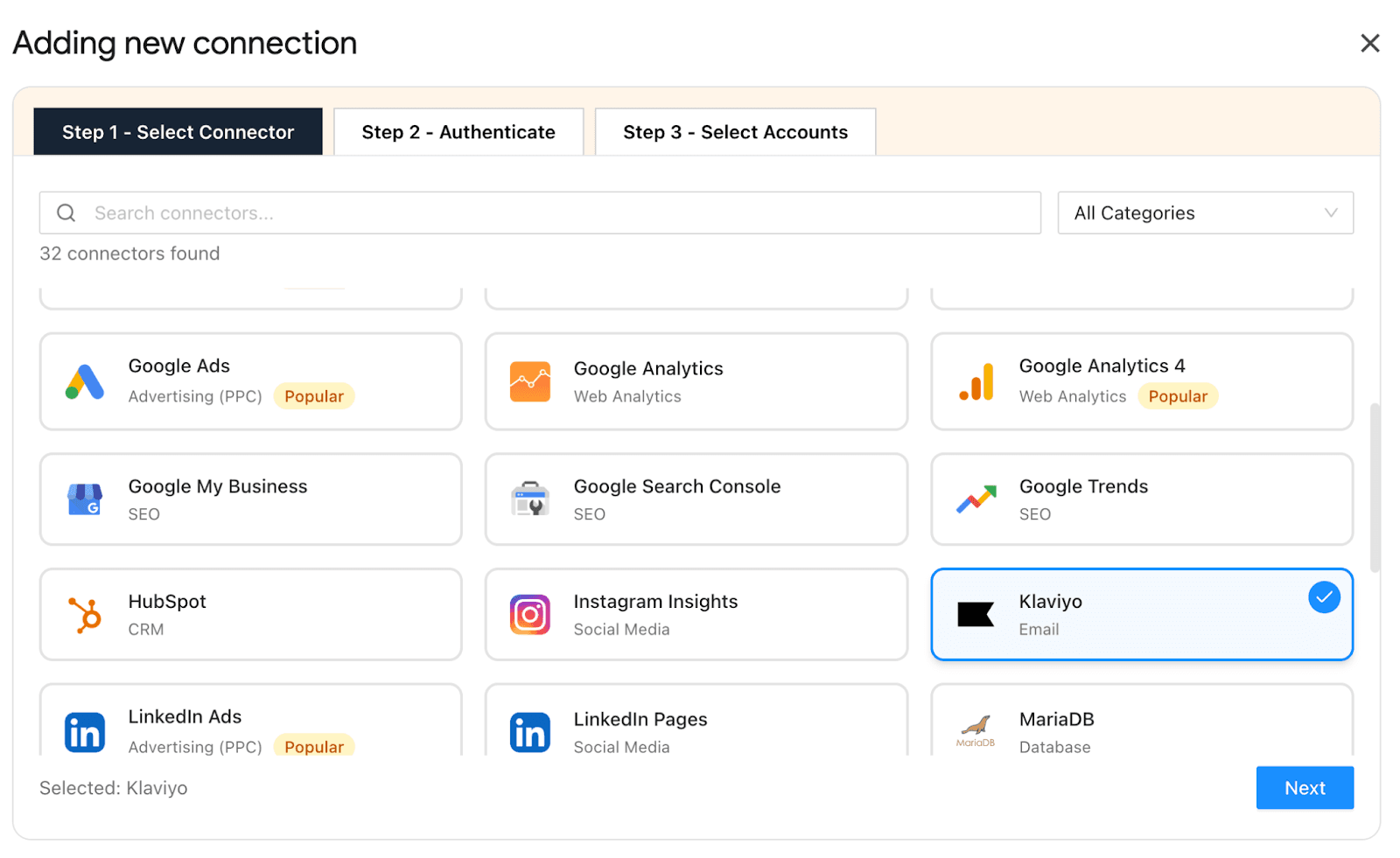
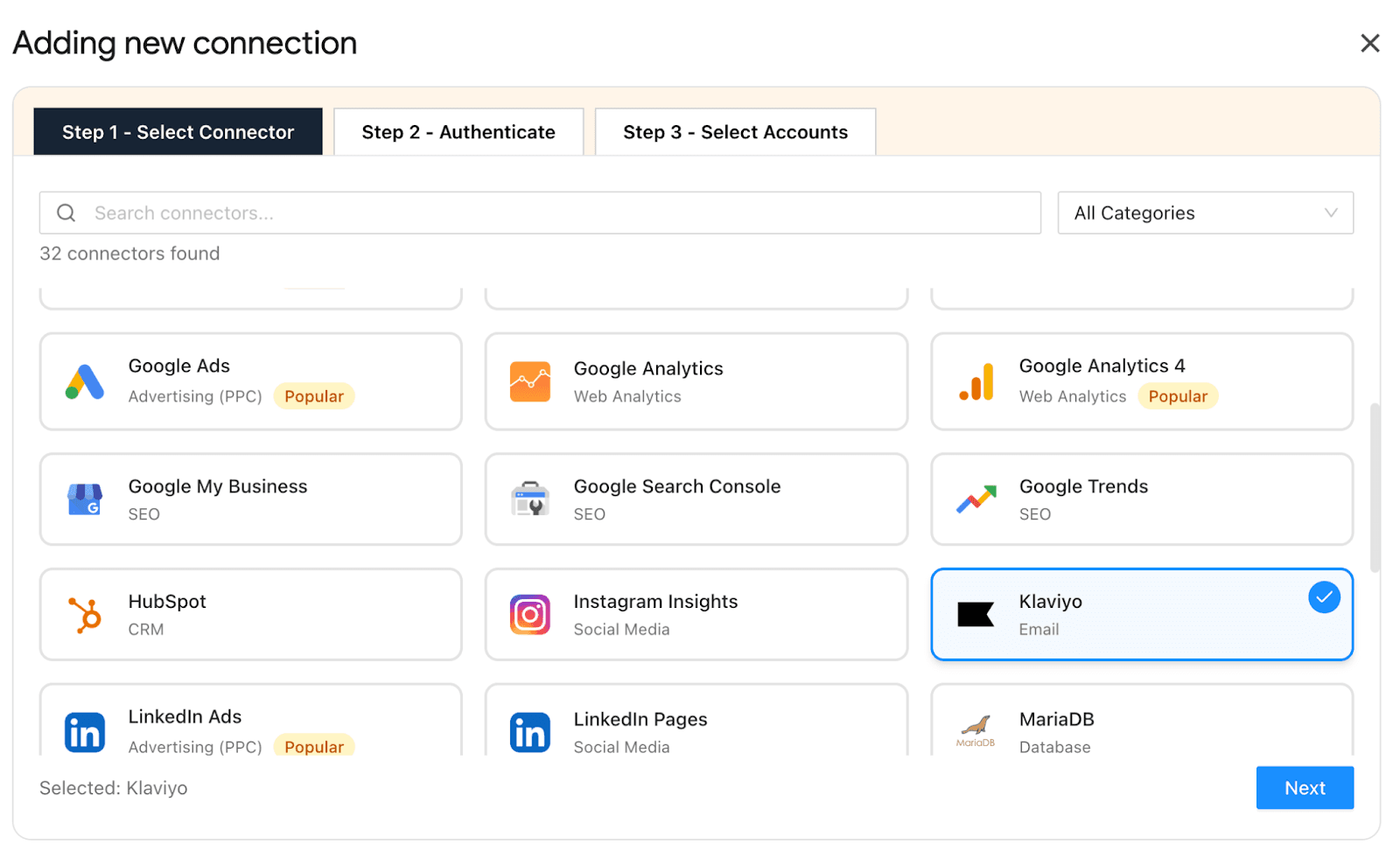
Step 1: Connect Your Klaviyo Account with Two Minute Reports
- Install the Two Minute Reports add-on from the Google Workspace Marketplace.
- Generate your API key from Klaviyo, paste it into the Two Minute Reports sidebar, and authenticate the connection.
- Once connected, you can access and manage multiple Klaviyo accounts from a single workspace.
Step 2: Choose metrics based on your campaign goal
- Start with campaign metrics from Klaviyo, such as open rate, CTR, etc., to understand how your emails are performing.
- Next, include post-click metrics from your connected platforms, such as product views, orders, cancellations, or add-to-cart actions. This shows what users do after interacting with your email.
- Then track outcome metrics like conversions, orders, and revenue to measure actual business ROI.
- For flows, you can track key details like flow ID, flow created date, last updated date, trigger type, and status to understand how automations are set up, maintained and whether they are actively contributing to performance.
Step 3: Customize your email marketing dashboard
- You can either build from scratch or use pre-built Klaviyo templates to centralize your email marketing campaign performance.
- Include key metrics based on the funnel progression stages – reach, attention, outcome and sustainability.
- Create a clear visual breakdown by campaigns and flows. Campaigns help you evaluate one-time sends, while flows show ongoing performance.
- Then, classify by audience segments or time periods to compare how different groups or campaigns perform.
- Take full control of your dashboard by adding logo, interactive layouts, elements, etc., to deliver branded, professional reports to clients.
Step 4: Automate Your Email Marketing Dashboard
Once your dashboard is set up, the next step is to share up-to-minute insights with clients or stakeholders on a defined interval.
- Schedule your reports or dashboard to be delivered on a daily, weekly or monthly basis.
- Send your reports in your preferred format – PDF, Excel or Spreadsheet.
- Get notified of real-time error alerts when a scheduled query fails and quickly fix it before it impacts your client reporting workflow.
- Keep every report consistent, on time and every time.
How Should You Measure Different Types of Email Campaigns?
Evaluate each campaign based on the role it plays – by focusing on the right signal, supported by context, and watching where performance typically drops. Here’s how:
The goal is to match the metric to the campaign’s intent and read performance in that appropriate context to make sense of your data.
Wrapping Up
There are dozens of email marketing metrics, but the ones that matter tell a clear story, from list quality to engagement to conversions. The right metrics don’t just measure performance, they show you exactly where to act.
Two Minute Reports gives you that clarity in one place. Track opens, clicks, and conversions across campaigns, automate reporting at defined intervals, and share ready-made dashboards with clients without switching platforms or building reports from scratch.
Because knowing what’s working shouldn’t take longer than acting on it.
Frequently Asked Questions
The key stages of email marketing metrics are Reach, Attention, Outcome, and Sustainability. Each stage measures different aspects of your email's journey, from deliverability to engagement and conversions.
A high Bounce Rate indicates potential issues with list quality and sending reputation. High hard bounces can damage sender credibility, while repeated soft bounces may signal throttling or reputation problems.
You can optimize your Click-Through Rate by reducing cognitive load with one primary call-to-action (CTA), positioning CTAs clearly, and using behavioral segmentation to tailor content based on past interactions.
To create an email marketing dashboard with Two Minute Reports, connect your Klaviyo account, choose relevant metrics based on your campaign goals, customize your dashboard layout, and automate report delivery on a schedule. The best part is that you can also reuse your existing email marketing dashboards across clients, so you don't have to build reports from scratch.
Related Blogs




Meet the Author
Shalini MuruganShalini is driven by ideas that create a tangible impact. At Two Minute Reports, she specializes in content that helps marketers optimize their reporting workflows. When she's not transforming complex data into meaningful insights, you might find her lost in a book, jotting down ideas in her notebook, or connecting the dots others overlook.

