
Summarize this blog post with:
As a marketer, you’ve probably heard statements that make your palms sweat:
“I need more than just Google Ads metrics. Can you show us the conversion funnel breakdown?”
“I’m not sure how to read this Google Ads report. Can you make it more user-friendly?”
Or perhaps:
“Why is the report showing discrepancies with our Google Ads campa?”
These statements add more manual work, and when you’re juggling multiple clients, each with their own feedback, it can feel like a never-ending cycle. The pressure builds, and the process becomes quickly chaotic with repeated back-and-forth changes.
This is where you need a solid framework for creating Google Ads reports for your clients. With the right structure, you can deliver reports that not only justify your client’s budget but also help them take consistent, data-driven decisions with ease.
In this article, I’ll break down the steps to building a Google Ads report that’s clear, actionable, and designed to optimize your client’s campaign ROI.
Let’s get started.
Five key elements to create a winning Google Ads report
To create a winning Google Ads report that delivers true value, focus on the following five core elements:
1. Clarity – Making data understandable
A clear Google Ads report focuses on presenting insights that are easy to understand and follow without sacrificing crucial details.
How to apply: Use language that’s simple and direct on point. Ensure that each metric directly ties back to your campaign goal, whether that’s increasing sales or generating brand awareness.
2. Clear visuals – Communicate data effectively
Visual representations are not just helpful but essential in your Google Ads report. Instead of drowning in lengthy paragraphs, visuals clearly highlight the campaign performance in a digestible manner. Remember, a picture is worth a thousand words.
How to apply: Use interactive charts to display trends, ad performance, pie charts to demonstrate conversion breakdowns, and bar graphs to compare campaign performance across different countries. A well-designed Google Ads report should include clear labels and legends, keeping it simple to eliminate clutter.
3. Consistency – Building trust and familiarity
Consistency in how you report Google Ads metrics ensures that every report follows a standardized approach. This builds credibility and helps clients easily track progress over time.
How to apply: You can use pre-built Google Ads templates to create a clear, structured report with appropriate fonts, color schemes and branding. Your clients will know what to expect, making it easier to spot trends, identify issues, and appreciate the overall value of the campaigns you’re running.
Pro tip: With Two Minute Reports, you can reuse the existing reports across multiple clients. Simply copy the report, add the respective client accounts, and you’ll instantly get a duplicate of the original report, so that you need not start from scratch every time.
4. Transparency – Building trust and credibility
The rule is simple – be clear and upfront about the campaign’s success and failure. Your clients need to know the ‘why’ behind certain decisions that were made and how their budget is being spent.
How to apply: Do not cherry-pick the data that is favorable to you. Include all relevant data, even if it’s not flattering. When clients understand the rationale behind the campaign results, they feel confident in your ability to manage their campaigns effectively.
5. Clear Recommendations – Providing actionable insights
The real value of a Google Ads report lies in providing data-driven insights that can be used to improve campaign performance. Don’t just present the data, tell your clients how they can leverage it to improve ROI.
How to apply: Avoid vague or generic recommendations. Be specific about the actions that should be taken and the expected outcomes.
Now that you understand the elements that make a great Google Ads report, let’s dive into the steps for creating a structured Google Ads report for your clients.
How to structure your Google Ads report?
Here’s how you can structure the Google Ads report for your clients:
- Executive Summary: A quick overview of the most important campaign outcomes and takeaways.
- Performance overview: High-level metrics showing the campaigns’ overall health.
- Campaign/Ad group performance: Showcase a detailed breakdown of campaigns and ad group performance.
- Campaign trends and distribution: Compare the campaign trends over a time period, and set proper benchmarks for optimization.
- Next steps: Provide a clear, action-driven plan for optimizing the campaign based on gathered insights.
Now let’s analyze each section in detail:
1. Executive Summary:
The executive summary offers a concise overview of your campaign performance. It is the first section that your clients will instantly see in your Google AdWords report.
The goal is to quickly communicate whether the campaign met its objectives and suggest next steps for improvement.
What should it contain?
- Key metrics: Highlight key metrics based on your campaign goals – CTR, CPC, CAC, etc.
- Campaign goals: A brief mention of the primary objectives of the campaign.
- Performance highlights: Key successes or challenges during the campaign.
- Insights and recommendations: Actionable suggestions for optimizing Google Ads performance.
Here’s a relevant example:
This month’s Google Ads campaign resulted in a 30% increase in conversions, improving ROI by 17%. Moving forward, we recommend allocating 15% more budget to these high-performing campaigns and revisiting the bidding strategy for underperforming areas.
Irrelevant example:
The Google Ads campaign included multiple ad groups and keywords, but some performed better than the others. Some ads had a higher click rate, while others had a lower CTR. The results were mixed.
The above statement is irrelevant because it is vague and doesn’t give enough data or context for the clients or decision makers to act upon.
Pro tip: Follow these 3 tips to craft a value-driven executive summary:
- Focus only on the key metrics that matter to your client.
- Align the campaign performance directly with your client's goals.
- Keep it simple and short.
2. Campaign Performance overview
In this section, you can highlight the key metrics such as impressions, spend, CTR, conversions, etc for your campaigns. Consider this a high-level snapshot of how your campaigns are performing.
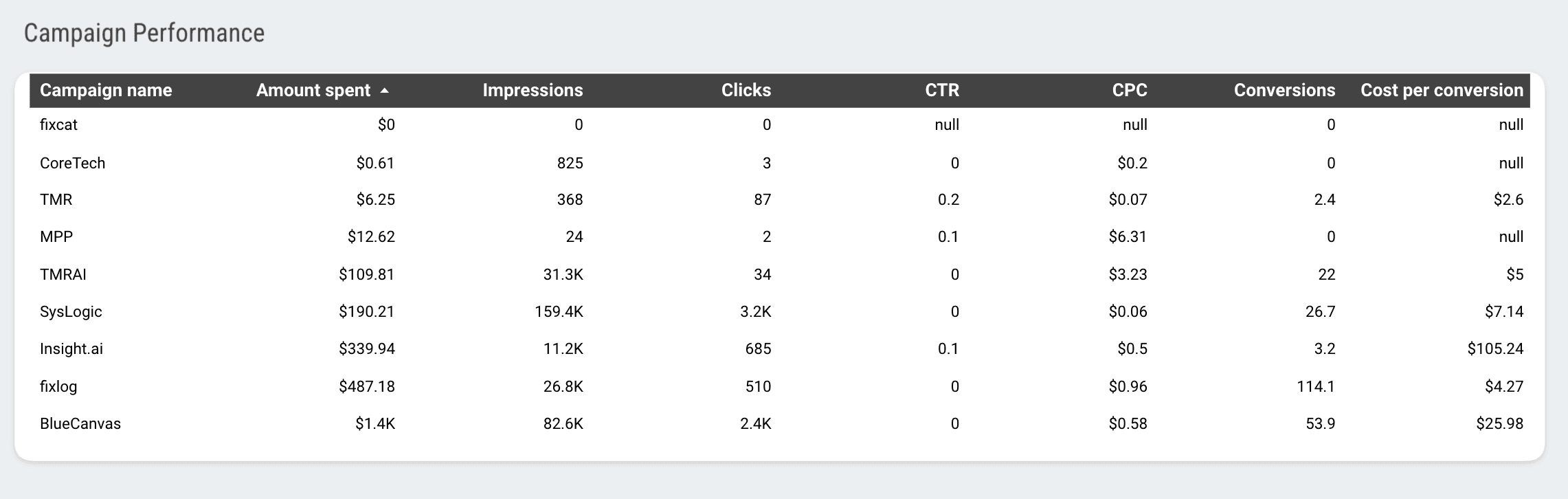
To get started, you can create a table and include all relevant metrics as shown above. However, instead of manually calculating for every campaign, you can use Two Minute Reports’ Google Ads Overview Report to automatically import your campaign KPIs. This way, you can focus on the crucial insights that help your campaigns succeed.
3. Performance breakdown by campaign, ad group and ads
This is the most important section of your Google Ads report. Here we’ll take a closer look at each campaign’s performance – analyze what’s working, what could be improved, and how to optimize budget allocation, campaign strategy, and tweak ad creatives.
This granular analysis is crucial for justifying your client’s investment. Make sure to communicate key findings clearly, so that the strategy behind your decisions and reporting is easy to understand and data-driven.
Pro tip: With Two Minute Reports’ Google Ads reporting tool, you can quickly break down your campaigns, ad groups, ads, keyword performance, bid, etc for multiple clients in a single dashboard. You just need to connect your ad accounts, extract relevant metrics, and visualize results instantly in Google Sheets or Looker Studio. No more switching spreadsheets or getting stuck in the native dashboard – everything is streamlined and automated for you.
4. Campaign trends and distribution
By analyzing how the campaigns have performed over time, you can see the bigger picture, which means visualizing the areas that drive value. Here’s how:
- Analyze whether the metrics are improving, declining or remaining stable. Also, consider external factors like seasonality or market shifts as they influence your campaign performance.
- Combine ad groups by themes, products, or services to identify which ones yield better conversions.
- Set benchmarks based on the best-performing ad groups and compare under-performing ones.
- Showcase breakdown of performance by networks – YouTube, Display networks, Search network, etc.
- Identify how different attribution paths help in strengthening your conversion funnel. This is crucial for optimizing your campaign’s bottom-of-funnel strategy.
This approach helps you unlock hidden potential opportunities and streamline campaign performance analysis for maximizing your client’s profitability and ROI.
5. Next steps and recommendations
This final section turns your campaign results into clear actions. Here we’ll outline the key recommendations and next steps needed to optimize your campaigns. In the end, your clients should know exactly what actions have to be taken to improve performance and drive better results.
A few examples include:
- Increase budget allocation for Product A campaigns, which have shown a 25% increase in conversions.
- Optimize mobile landing pages and ad creatives to improve user experience and boost conversion rates, since mobile users are converting 25% more.
- Increase bids in Colombia, where conversion rates are 30% higher, to capture potential traffic.
Pro tip: Give direct, tangible tips based on your data-driven campaign analysis. Keep it straightforward.
With this 5-step approach, you can present effective Google AdWords reports that not only highlight your agency’s expertise but also act as strong evidence in proving your client’s ROI.
How to create and automate your Google Ads report?
With the native Google Ads dashboard, creating and automating reports across multiple clients feels scattered and time-consuming. By using Two Minute Reports’ Google Ads reporting tool, you can unify everything in one place without manual effort. Here’s how:
1. Install the Two Minute Reports add-on from the Google Workspace Marketplace.
2. Launch the Two Minute Reports add-on in your spreadsheet. Once done, connect your Google Ads account to Google Sheets to import your client(s) ad accounts.
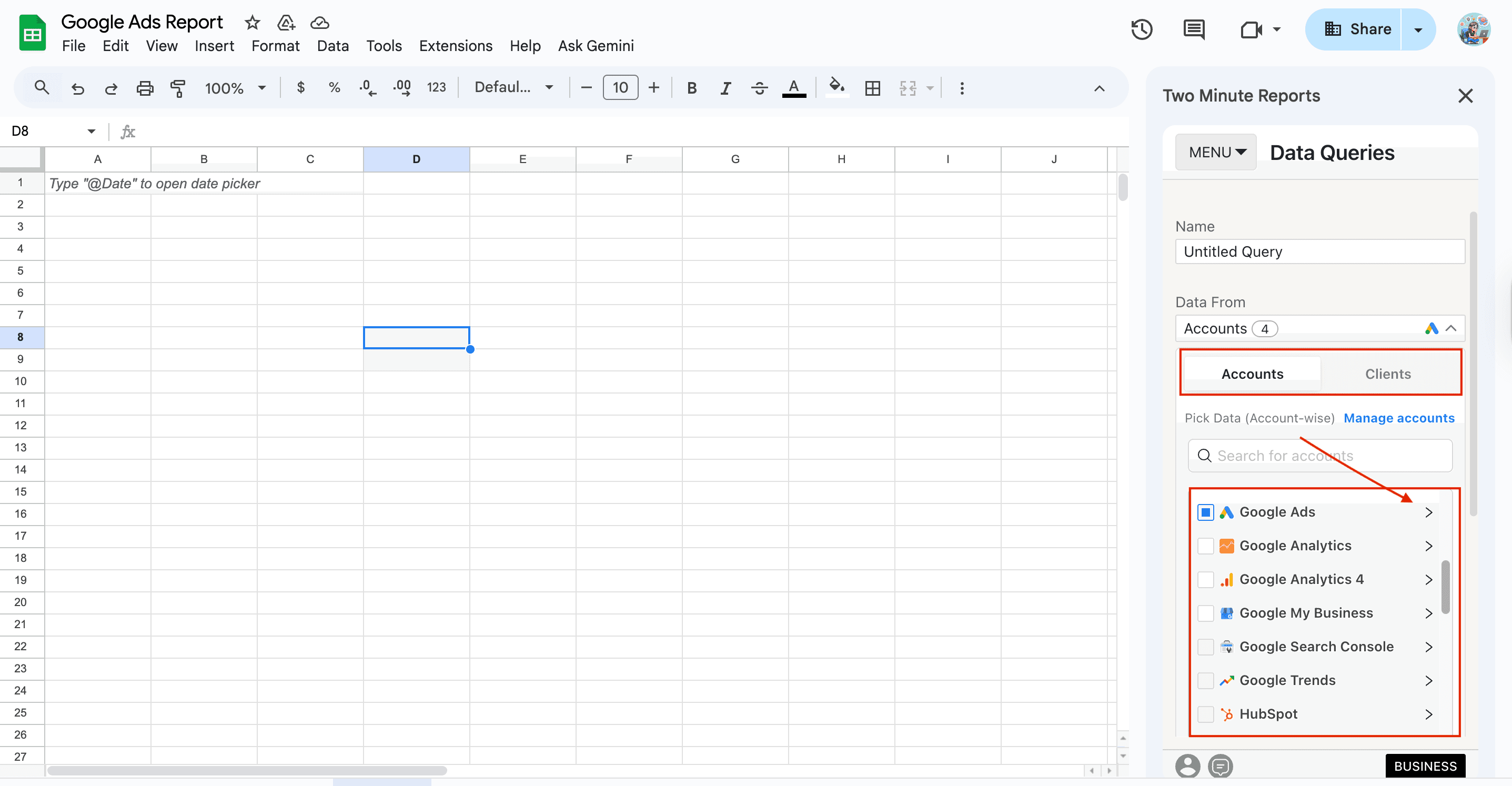
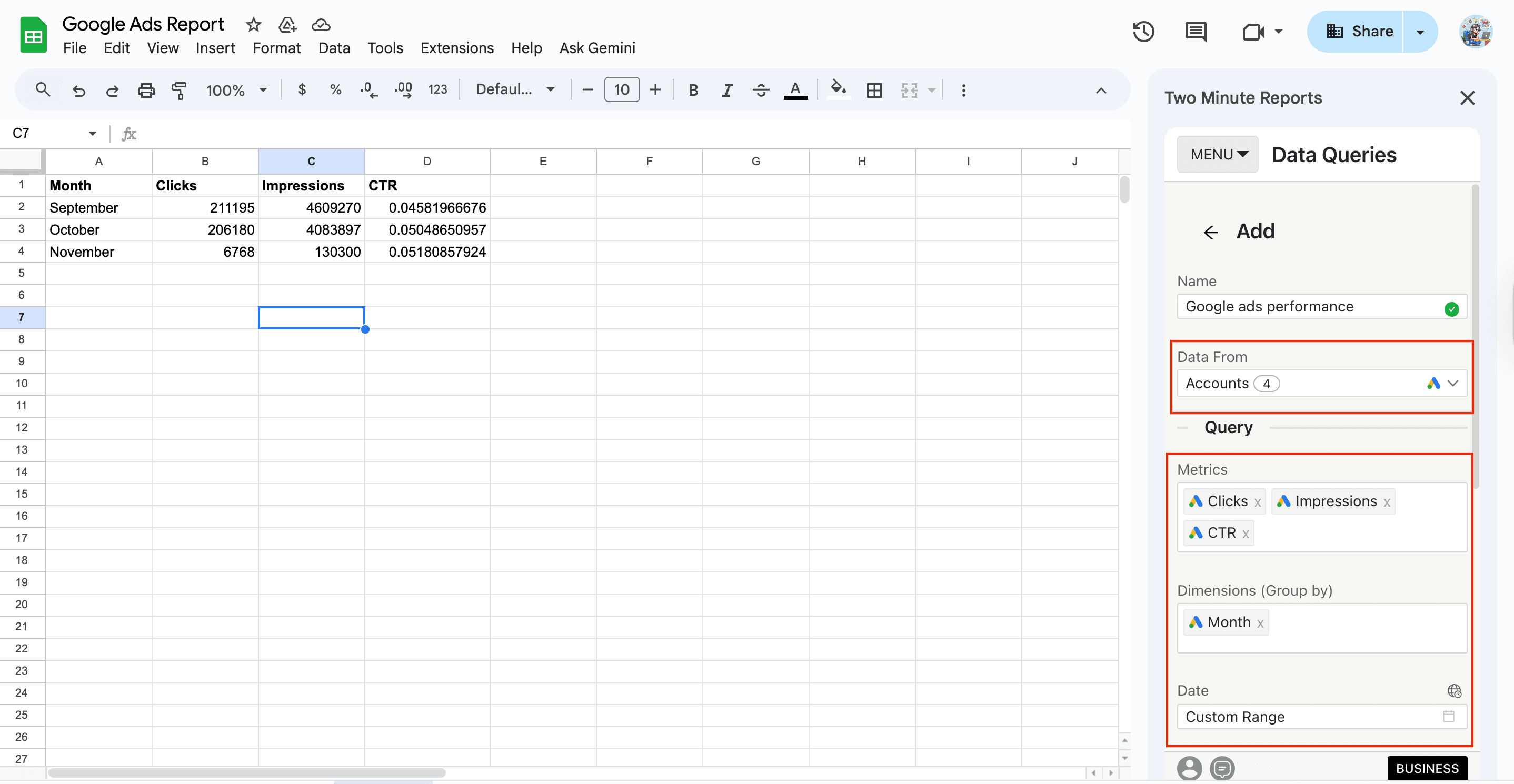
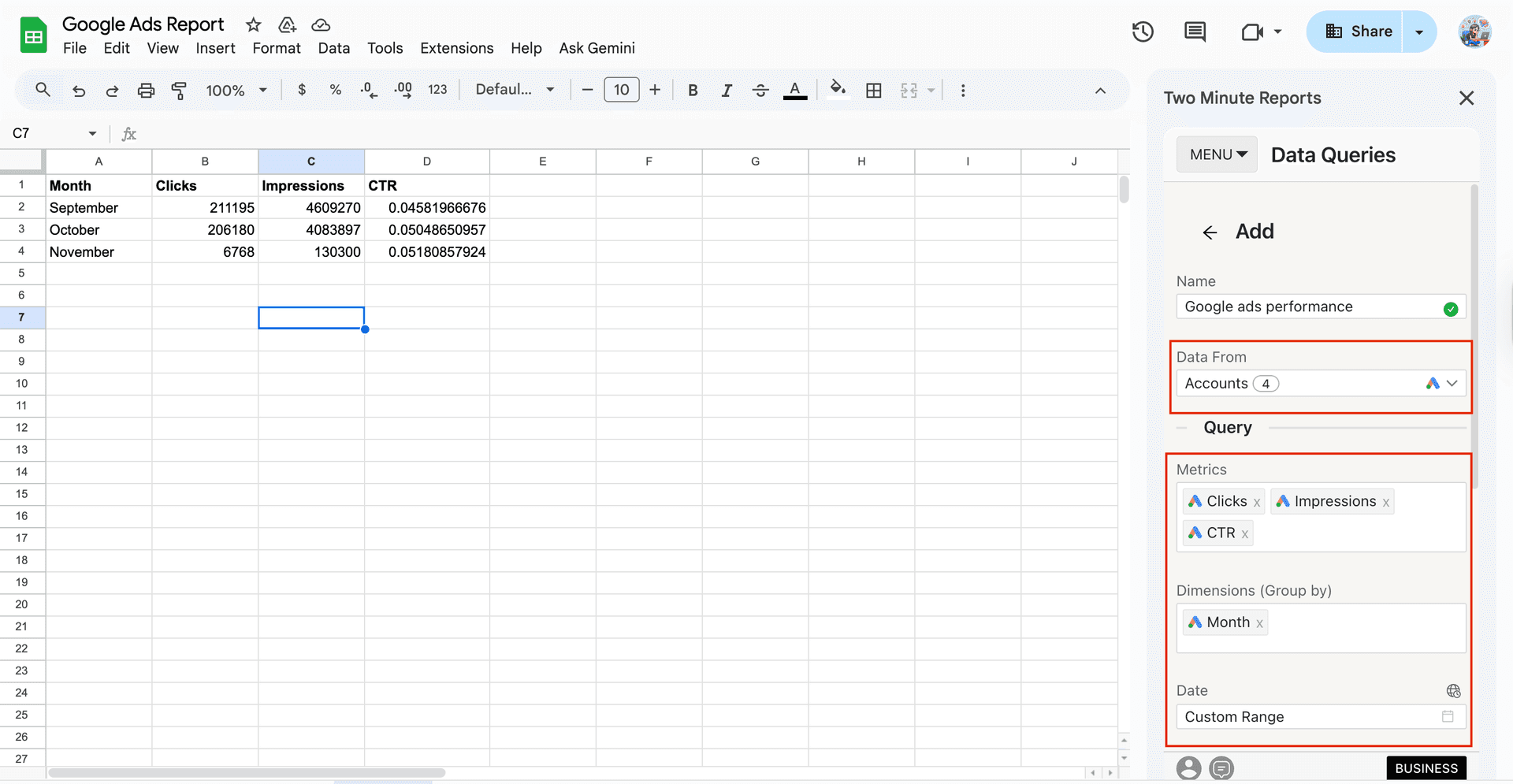
3. Next, select your desired ad accounts, specify key metrics and dimensions, date range to measure campaign performance and run your query.
4. And that’s it. You can visualize actionable Google Ads campaign performance insights across multiple clients in a single dashboard – this is how reporting can be faster and easier.
Pro Two Minute Reports tips:
- When selecting the date range, you can also use the Custom Range (cell reference) option. Simply enter the start and end dates in the required cells. After that, you can periodically update the dates in those cells and your reports get refreshed dynamically.
- You can set up automated refresh schedules (daily, weekly or monthly) and keep your clients informed with real-time, up-to-minute performance updates.
Wrapping up
Creating a Google Ads report for your clients doesn’t have to be a huge headache. It’s really about knowing what numbers matter most to them and showing how their campaigns are helping them drive profitability. With that said, here are the key takeaways you can focus on:
- A good Google Ads report shows clients how their campaigns are performing and what revenue they are getting for their money.
- Focus on the important metrics that align with what your clients want to achieve, rather than listing every single metric.
- Use engaging visual elements such as charts and graphs to help clients easily understand the context. Keep it simple and relevant.
- Always explain what the numbers mean. Connect the ad performance to your client’s overall campaign goals and suggest actionable next steps for improvement.
- Use Two Minute Reports' Google Ads reporting tool, to create and automate multi-client Google Ads campaign reports in Google Sheets and Looker Studio.
Frequently Asked Questions
Think of a Google Ads report as a summary of how your campaigns perform. It shows how much you’ve spent, how many people interacted with your ads, who clicked them, and what happened after they clicked. This streamlined analysis helps your clients see if their budget is being used well and brings in potential customers or sales.
Google Ads reports are significant because they show clients exactly what’s happening with their advertising money. It proves that your agency is doing a great job in strategizing and reporting campaign performance with actionable next steps for improvement. This enhances credibility, transparency and reinforces agency-client relationships.
The most important Google Ads metrics include impressions, CTR, CPA, conversion rate, quality score, ROAS, search impression share, and average position. Set up weekly or monthly refresh schedules to monitor these metrics on a real-time basis.
With Two Minute Reports, you can automatically import your client’s Google Ads campaign KPIs and create custom Google Ads dashboards instantly. This saves a lot of time, so you can focus more on optimization and less time on juggling spreadsheets. Plus, with white-labeling your reports look more organized and professional, highlighting your agency’s reputation.
Related Blogs





Meet the Author
Shalini MuruganShalini is driven by ideas that create a tangible impact. At Two Minute Reports, she specializes in content that helps marketers optimize their reporting workflows. When she's not transforming complex data into meaningful insights, you might find her lost in a book, jotting down ideas in her notebook, or connecting the dots others overlook.
