
Summarize this blog post with:
In the rapidly evolving digital landscape, the old playbook for Instagram success has been completely rewritten. We have moved far beyond the era where posting more was a viable strategy; today, visibility is earned through precision, not volume. Instagram has fundamentally shifted from a platform driven by vanity metrics, such as superficial likes, to one powered by meaningful interactions.
As the algorithm continues to favor deep engagement signals, Reels, Saves, and Sends have emerged as the primary signals for reach and authority. A send is no longer just a share; it is a personal recommendation that tells the algorithm your content is highly relevant. Similarly, a Save signals long-term value and utility. If your reporting doesn't account for these shifts, you aren't just missing data; you’re missing the strategy.
In this environment, an Instagram analytics report is no longer just a number-collecting exercise to be filed away at the end of the month. Instead, reporting has become a form of storytelling. It is the process of translating raw data into actionable insights that prove real ROI to clients and stakeholders, moving the conversation from how many followers did we gain to how our content is driving business growth.
This guide is designed to help marketers, agencies, brands, and freelancers navigate this data-driven world. Whether you are looking to justify a higher budget to a stakeholder or simply want to stop guessing what content works, mastering your Instagram analytics is the first step toward predictable success.
What is an Instagram Analytics Report?
At its simplest, an Instagram analytics report is a document that collects, organizes, and interprets data from your Instagram activity. Its primary purpose is to provide a clear snapshot of how your profile, content, and paid campaigns are performing against specific business goals.
While individual metrics tell you what happened, a report explains why it happened and what you should do next. It transforms scattered data points into a cohesive story that helps you justify marketing spend, refine your creative strategy, and prove the value of your social media efforts to stakeholders.
Instagram Insights vs. Analytics Reporting: What’s the Difference?
Many users confuse the two, but there is a distinct difference between checking your insights and creating a report.
- Instagram Insights (Native): This is the free, built-in tool within the Instagram app. It’s excellent for a quick temperature check. However, it is designed for real-time monitoring and has significant limitations: data is typically capped at a 90-day window, visuals are basic, and the data is trapped inside your mobile device.
- Analytics Reporting: This involves exporting that data (either manually or via automation) into a structured format like a Google Sheet, PDF, or Looker Studio dashboard. Reporting allows for historical tracking (beyond 90 days), cross-platform comparisons, and the ability to add contextual commentary. A report is a professional asset; Insights is a management tool.
When Should You Create Reports?
The frequency of your reporting should match the pace of your decision-making. Today, most successful agencies and brands follow this three-tiered cadence:
What Metrics Should an Instagram Analytics Report Include?
Simply listing numbers isn't enough. You need to categorize your metrics to show how different parts of your Instagram presence contribute to your overall goals.
1. Profile Performance Metrics
These metrics track the health of your brand’s home base on Instagram. They show whether you are attracting the right audience and how well your profile converts viewers into followers.
- Follower Growth Rate: Rather than just looking at the total count, track the percentage of growth. A healthy growth rate for most brands is expected to be between 1% and 3% per month.
- Profile Visits: This measures how many people were curious enough after seeing your content to click through to your bio. It’s a key indicator of brand interest.
- Reach vs. Impressions: Reach is the number of unique users who saw your content.
- Impressions is the total number of times it was seen.
- Pro Tip: If your impressions are significantly deeper than your reach, it means your audience is viewing your content multiple times, a sign of high quality.
2. Content Performance Metrics (Updated for 2026)
The like has been dethroned. The current algorithm uses a weighted system where Saves and Sends (Shares) are the primary signals for distribution.
- Engagement Rate by Reach (ERR): This is more accurate than engagement by followers. Aim for 2% to 5% per post.
- Saves & Sends: These are the intent metrics. A Save signals value; a Send signals virality. Today, a DM share is weighted 3–5x higher than a Like because it represents a personal recommendation.
- Average Watch Time: Success means keeping viewers for at least 50% of the video duration.
- Completion Rate: The percentage of people who watched to the very end. The algorithm prioritizes Reels with high completion and rewatch behavior.
3. Stories Metrics
Stories are your loyalty channel. They aren't about reaching new people; they are about keeping your current community engaged.
- Story Completion Rate: Calculated as (Viewers of last slide / Viewers of first slide) * 100. A rate above 70% indicates your storytelling is effectively hooking your audience.
- Taps Forward: Users are skipping ahead (content might be too slow).
- Taps Back: Users liked it so much they wanted to see it again (a huge positive signal).
- Exits: Where exactly are people dropping off? This helps you identify which types of Story slides are boring your audience.
4. Instagram Ads Metrics
If you’re running paid campaigns, you must separate these from your organic data to avoid skewed results.
- CTR (Click-Through Rate): The median for Instagram ads is roughly 1.2% to 1.8%, depending on the industry.
- Conversion Rate & ROAS: The bottom line metrics. Are your ads actually making money? A target ROAS (Return on Ad Spend) of 3x to 5x is the standard benchmark for profitable e-commerce brands.
5. Competitor Benchmarking
Reporting in a vacuum is a mistake. Stakeholders want to know if a 2% engagement rate is good compared to the rest of the industry.
- Market Position: Track competitor follower growth to see if your niche is expanding or if you are losing market share.
- Content Patterns: Are your competitors shifting 80% of their budget to Reels? Do their Carousels get more Saves than yours?
- Engagement Benchmarking: Comparing your engagement rate against 5–10 direct competitors gives your data context. It proves that your results aren't just a fluke; they are a competitive advantage.
How to Create an Instagram Analytics Report Manually?
If you are just starting or managing a small personal brand, creating a manual report is a great way to get started. It helps you understand exactly where the numbers come from before you move toward automation.
Here is the step-by-step process for building a manual report:
1. Exporting Data from Instagram Insights & Meta Business Suite
Since the Instagram mobile app doesn't offer a direct ‘Download to CSV’ button for all metrics, you have to use a combination of methods:
- The Mobile Method: Open your Professional Dashboard > See All Insights. You will need to manually record the top-level numbers (Reach, Engagement, Profile Visits) for your chosen timeframe (e.g., last 30 days).
- The Desktop Method (Meta Business Suite): For more detailed content data, log in to Meta Business Suite on your computer. Go to Insights > Content. Here, you can select your date range and click Export Data to download a .CSV or .XLS file of your post-level performance.
2. Organizing Metrics in Google Sheets or Excel
Once you have your raw numbers, you need to give them structure. A standard manual report usually consists of three tabs:
- The Summary Tab: A high-level view showing total follower growth, total reach, and overall engagement rate for the month.
- The Content Log: A list of every post, Reel, and Story published. You'll manually input the Saves, Sends, and Plays for each to identify your hero content.
- The Audience Tab: A snapshot of your follower demographics (Top Cities, Age Ranges, and Gender) to ensure your content is reaching the right people.
3. The Realities of Manual Reporting
While manual reporting is free, it has become increasingly difficult to maintain as Instagram’s ecosystem grows more complex. Marketers face three major manual hurdles:
- The 90-Day Cliff: Instagram Insights only retains detailed data for about 90 days. If you forget to export your data for one month, that historical record is gone forever, making year-over-year comparisons impossible.
- The Story Problem: Story analytics are notoriously ephemeral. If you don't catch the data within 24 hours of the Story expiring, the taps and exits data becomes much harder to aggregate manually.
- Human Error & Data Fatigue: Manually copying numbers from a phone screen to a spreadsheet is prone to typos. When you're managing multiple clients, this process can take 3–5 hours per client, leaving you with very little time to actually analyze the data and make strategic changes.
Manual vs Automated Instagram Reporting (With Comparison Table)
As your brand or agency grows, the how of your reporting becomes just as important as the what. The choice between manual and automated reporting is often the difference between being a data-cruncher and a high-level strategist.
While manual reporting is a great starting point for beginners to understand the nuances of their metrics, it quickly becomes a bottleneck. Automation, on the other hand, allows you to shift your energy from gathering data to interpreting it.
Comparison: Manual vs. Automated Reporting
Why Automation Wins in 2026?
The most significant advantage of automation isn't just the time saved; it's the reliability of the narrative. When you use a tool like Two Minute Reports, you aren't just looking at a snapshot in time; you're looking at a living, breathing dashboard that updates in real-time. This allows you to catch performance dips on a Tuesday and fix them by Wednesday, rather than waiting for a monthly report to realize a campaign underperformed.
For agencies managing 5, 10, or 50 clients, automation is the only way to maintain a professional standard without skyrocketing your overhead costs.
How to Create and Automate Your Instagram Analytics Report?
Manual data entry is no longer just a chore; it’s a competitive disadvantage. Automated Instagram reporting refers to the use of specialized software that connects directly to Instagram’s API to pull, organize, and visualize your data without any manual intervention.
Instead of copying numbers from your phone into a spreadsheet, you set up a data pipeline. Once configured, your reports refresh themselves on a schedule (daily, weekly, or monthly), ensuring you always have the latest insights at your fingertips.
The Strategic Benefits of Automation
Whether you are managing a single brand in-house or juggling fifty clients at an agency, automation transforms your workflow from reactive to proactive.
- For In-House Teams: Automation eliminates the monthly scramble. It allows you to keep a live dashboard visible to your manager or CMO at all times, demonstrating the constant value of your social media efforts. It also frees up your team to focus on high-value tasks, like creative testing and community building, rather than data formatting.
- For Marketing Agencies: Scalability is the biggest win. Automation allows a single account manager to handle significantly more clients without a drop in reporting quality. You can deliver professional, white-labeled reports that look like they took hours to build, all while spending just minutes.
- Deep Historical Tracking: Native Instagram Insights often limits you to a 90-day window. Automation tools fetch and store your data, allowing you to track year-over-year trends and long-term growth that the app simply can't show you.
What to Look for in an Automation Tool?
Not all reporting tools are created equal. When selecting a solution, ensure it checks these critical boxes:
- Direct API Integration: Ensure the tool is an official Meta Business Partner. This guarantees your data is accurate and that your account remains compliant with Instagram’s terms of service.
- Cross-Platform Flexibility: Your Instagram data shouldn't live in a vacuum. Look for tools that can pull data into familiar environments like Google Sheets (for deep analysis) or Looker Studio (for high-end client presentations).
- Support for All Content Types: A tool that only tracks feed posts is useless. You need granular data for Reels (retention & watch time) and Stories (taps & exits).
- Auto-Refresh Capability: The best tools don't just export data; they sync it. Your report should update automatically so that when you open it on Monday morning, the weekend’s data is already there.
Using Two Minute Reports for Instagram Analytics Reporting
As we have seen, the gap between manual data entry and strategic growth is time. This is where Two Minute Reports comes in, a reporting tool specifically designed to bridge that gap by automating the entire data pipeline from Instagram directly into your favorite analysis tools, Google Sheets, and Looker Studio. It is built to serve:
- Marketing Agencies: Who need to scale reporting across dozens of clients without increasing headcount.
- In-House Teams: Who want to maintain live internal dashboards for stakeholders.
- Multi-Brand Managers: Who need to compare performance across multiple Instagram accounts in a single view.
How Two Minute Reports Simplifies Instagram Analytics Reporting?
The ‘Two Minute’ in the name isn't just a marketing slogan; it’s a reflection of the workflow. Two Minute Reports simplifies the reporting process in four key ways:
- Direct Integration (No More CSVs): It pulls your Instagram data directly into Google Sheets or Looker Studio via the official Meta API. This eliminates the need for manual exports and the tedious cleaning of data.
- Auto-Refreshing Dashboards: Once you’ve built your report, you never have to touch it again. You can schedule a refresh of your data hourly, daily, or weekly. When you open your sheet or dashboard, the latest numbers are already there.
- Scheduled Report Delivery: You can set it to automatically email your reports to clients or managers in PDF or Excel format. This ensures your stakeholders stay informed even when you’re busy with other tasks.
- Speedboost for Agencies & Busy Teams: Two Minute Reports drastically cuts down the data loading time when creating a report. Instantly get your error-free data with a few clicks, and you can also rely on us for accurate historical data.
- Custom Branding for Client-Ready Reports: Brand your dashboards and exports with your own logo, colors, and styling. Whether you’re sharing a Google Sheets report or a Looker Studio dashboard, you can present it in a polished, client-ready format that reflects your agency or company identity.
With these capabilities working together, Two Minute Reports takes the frustration out of Instagram analytics. Instead of spending hours extracting data, formatting sheets, and preparing presentations, you get reliable, ready-to-use insights in minutes. It’s faster, cleaner, and built to scale with your reporting needs, whether you’re managing one brand or dozens.
What You Can Track With Two Minute Reports?
Two Minute Reports doesn't just pull surface-level numbers; it gives you access to the granular data needed for strategies:
- Profile-Level Performance: Track long-term follower growth, profile visits, and website clicks to measure brand awareness.
- Reels & Video Insights: Get deep into the algorithm signals with data on Reels plays, total watch time, and average retention.
- Stories Metrics: Monitor the health of your community with Story reach, impressions, and navigation metrics (Taps Forward/Back).
- Paid vs. Organic: If you run ads, you can visualize organic Instagram Insights with your Instagram Ad data to get a complete full-funnel view of your performance in one place.
- Historical Data: Two Minute Reports allows you to store and track metrics well beyond Instagram’s native 90-day limit, enabling powerful year-over-year comparisons.
Instagram Analytics Report Templates by Two Minute Reports
Data is only as valuable as your ability to communicate it. Even with the best data pipeline, a cluttered spreadsheet can overwhelm a client or stakeholder. This is why Two Minute Reports provides pre-built templates designed to turn raw numbers into a clear, professional narrative.
Why Use Instagram Analytics Templates?
Starting from a blank canvas is the biggest time-sink in reporting. Using a template provides three immediate advantages:
- Faster Setup: Instead of building charts from scratch, you simply connect your data source and watch the dashboard populate in seconds.
- Consistent Reporting Structure: Templates ensure that your monthly reports look the same every time, making it easier for clients to track progress over long periods.
- Clarity for Stakeholders: Our templates are designed with data UX in mind, placing the most important metrics at the top to ensure your message isn't lost in the weeds.
Instagram Analytics Templates Available in Two Minute Reports
Two Minute Reports offers three primary types of templates depending on your specific needs:
Instagram Insights Monitoring Report
Track your daily and weekly Instagram performance at a glance with a simple, auto-updating report.

2. Instagram Insights Dashboard
Visualize your key Instagram metrics in one clean dashboard that refreshes automatically.
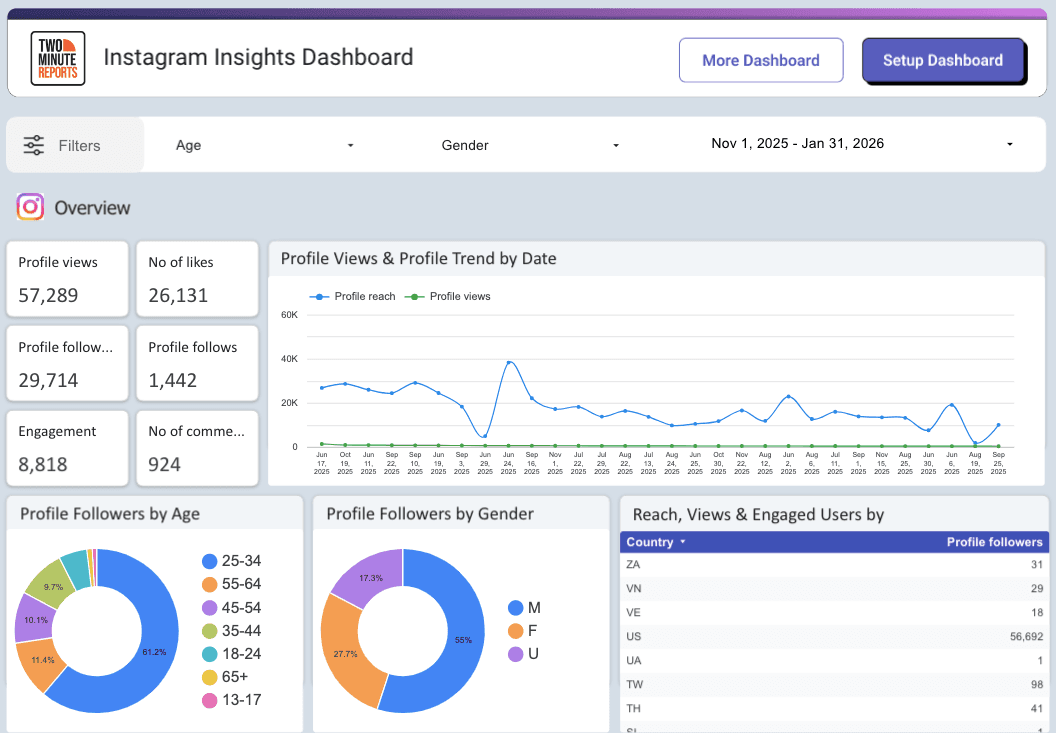
3. Instagram Insights Profile Analytics
Get a complete breakdown of your profile’s growth, reach, engagement, and audience trends in one place.

How to Present an Instagram Analytics Report to Clients or Teams?
The most beautiful dashboard in the world won’t save a social media strategy if you can’t explain the story behind the numbers. When presenting to clients or internal stakeholders, your goal is to bridge the gap between technical data and business value.
Turning Data into Insights: The Story Behind the Numbers
Stakeholders are less interested in a list of numbers and more interested in patterns. Don’t just report that your reach is up; explain why it happened and what it means for the next quarter.
- The Context Rule: Always pair a metric with an observation.
- Instead of: We had 500 saves this month.
- Try: Our 'Industry Secrets' carousel series generated 500 saves, a 40% increase over our product shots, proving that our audience currently values educational content over promotional posts.
- Highlight Wins, Losses, and Next Steps: Transparency builds trust. If a campaign underperformed, don't hide it. Use the data to show what you learned.
- The Win: Our collaboration with [Influencer Name] drove a 15% spike in profile visits.
- The Loss: The static image series for the product launch had low retention.
- The Pivot: Moving forward, we will convert these static launch assets into short-form Reels to capitalize on the algorithm’s preference for video watch time.
Explaining Reach vs. Impressions (Simply)
This is the most common point of confusion for clients. Use this simple room analogy to explain it in seconds:
- Reach is the Number of People in the Room: It counts how many unique individuals saw your content. If 100 people saw your post, your reach is 100.
- Impressions is the Number of Times the Message was Heard: If those same 100 people saw your post twice (maybe once in their feed and once on a friend's story), your impressions would be 200.
- Why it matters: Deep impressions with low reach mean your current followers are seeing your content multiple times (building brand depth). High reach means you are successfully breaking into new audiences (building brand breadth).
Justifying Content Format Changes Using Data Trends
One of the hardest parts of a social media manager's job is convincing a client to stop doing what used to work. Use data trends as your shield:
- The Video Mandate: If a client insists on static photos but the data shows Reels have a 2.4% engagement rate vs. the feed’s 1.1%, show them the comparison side-by-side.
- The Pause Signal: Explain that the algorithm now tracks Watch Time and Sustained Viewing. Show them the retention graph for your Reels. If people are dropping off at 3 seconds, use that data to justify a budget for better video hooks or professional editing.
- Saves as Digital Currency: If a client is obsessed with Likes, show them that Saves and Sends are now the primary signals for unconnected reach. Explain that every Save is a bookmark that keeps your brand top-of-mind, while a Like is just a passing gesture.
Best Practices for Instagram Analytics Reporting
Data is only as powerful as the way you use it. Brands that dominate Instagram aren't the ones posting the most; they are the ones that have mastered the art of data-led creativity.
To ensure your reports drive actual business growth, follow these four foundational best practices:
1. Focus on Trends, Not Isolated Numbers
A single post getting 1,000 likes is a moment; a 20% increase in average engagement over three months is a trend.
- Avoid Data Snacking: Looking at numbers day-by-day can lead to knee-jerk reactions.
- Look for the Why: If you see a spike in reach, don’t just celebrate. Investigate. Was it a specific trending audio? A collaboration? A certain time of day?
- The Rule of 2026: If a data point doesn't help you decide for next week's content, it’s just noise.
2. Show MoM and QoQ Changes
Context is everything. Your stakeholders need to know if your current performance is normal or exceptional.
- MoM (Month-over-Month): Essential for tracking short-term growth and the immediate impact of new content experiments.
- QoQ (Quarter-over-Quarter): Crucial for seeing the big picture. It helps you smooth out seasonal dips (like the post-holiday slump) and show long-term brand health.
- Comparison Formula: Always include a percentage change next to your raw numbers. Seeing Saves: 450 (+22% vs. last month) is far more impressive to a client than just seeing the number 450.
3. Segment Data by Content Type
Instagram effectively runs three separate algorithms: one for the Feed, one for Stories, and one for Reels. Mixing their data will give you a blurry picture of your success.
- Reels: Focus on Discovery. Track reach, completion rates, and sends to see how well you’re finding new audiences.
- Stories: Focus on Loyalty. Track completion rates and taps back to see how well you’re nurturing your current followers.
- Posts/Carousels: Focus on Education/Intent. Track "Saves" and "Link Clicks" to see if your audience is considering your brand as a solution.
4. Connect Metrics to Business Goals
The ROI Gap happens when marketers report on social metrics while the business cares about revenue. To bridge this, align your reporting with the three stages of the funnel:
Common Instagram Reporting Mistakes (And How to Avoid Them)
Even with access to the best data, it is easy to fall into traps that make your reports less effective. When data fatigue is a real concern for stakeholders, avoiding these common errors will set your reporting apart.
1. Reporting Vanity Metrics Instead of Intent Signals
The biggest mistake in modern reporting is giving too much weight to Likes. While they look good on a chart, Likes are low-friction actions.
The Fix: Shift your focus to Saves and Sends. According to the current algorithm, a Save is a bookmark for future intent, and a Send is a direct peer-to-peer recommendation. These are the metrics that actually drive reach and revenue.
2. Not Separating Paid and Organic Performance
Mixing your boosted posts and ad campaigns with your organic reach creates a false positive in your data. It becomes impossible to tell if your content strategy is actually working or if you’re simply paying for visibility.
The Fix: Create two distinct sections in your report. Analyze organic performance to judge content resonance and paid performance to judge conversion efficiency (ROAS).
3. Overloading Reports with Unnecessary Data
A 50-page report isn't thorough; it’s unreadable. Including every possible metric (like hourly follower fluctuations) dilutes the impact of your most important KPIs.
The Fix: Follow the Rule of Three. For every section, highlight the 3 most important metrics that relate directly to the business goal. If a metric doesn't lead to a decision, leave it out.
4. Including No Insights or Recommendations
A report that only contains numbers is just a spreadsheet. Clients pay for your expertise, not just your ability to copy-paste.
The Fix: For every win or loss in the data, include a ‘Why’ and a ‘Next Step.’ Example: Reel views dropped 15% (the data) because we tested longer formats (the why). We will return to 7-second 'micro-tips' next month to boost retention (the recommendation).
Build Instagram Reports That Drive Strategy
An Instagram analytics report is no longer a luxury; it’s the backbone of a sustainable social media strategy. By moving away from vanity metrics and focusing on deep engagement signals like Saves, Sends, and Watch Time, you transform your reporting from a monthly chore into a competitive advantage.
A well-structured report does more than just show what happened; it provides the roadmap for what to do next. It justifies your budget, proves your value to stakeholders, and ensures that your creative efforts are always backed by hard evidence.
Frequently Asked Questions
Reach counts the number of unique accounts that saw your content. If 100 people see your post, your reach is 100. Impressions count the total number of times your content was displayed, including repeat views by the same person. Instagram began standardizing these under views to provide a more consistent look at content consumption.
Reels should be evaluated based on discovery and retention (Watch Time and Completion Rate), as they are designed to reach new audiences. Static posts and Carousels should be evaluated based on educational value and intent (Saves and Sends). Always segment these in your reports to see which format is driving brand awareness versus brand loyalty.
For most brands and agencies, Monthly is the standard for deep-dive ROI reporting. However, Weekly pulse checks are recommended for social media managers to adjust content tactics in real-time. Campaign-based reports should be generated immediately following a specific launch or influencer collaboration.
While Instagram Insights and Meta Business Suite are great for free, basic data, professional reporting in 2026 favors automation. Tools like Two Minute Reports are ideal for those who want to pull data into Google Sheets or Looker Studio. For all-in-one management, tools like Sprout Social or Hootsuite remain popular for enterprise-level teams.
Yes. Automation is the industry standard for agencies. By using an automated reporting tool like Two Minute Reports, you can link Instagram’s API directly to your reporting dashboard. This allows your data to auto-refresh daily or weekly and can even be scheduled to email a PDF version directly to your clients.
Instagram Insights provides highly accurate, first-party data. However, it has a retention cliff; most detailed data is only available for 90 days (though some top-level metrics now extend to 2 years). To ensure long-term accuracy and historical tracking, it is best to use an automation tool to fetch and store your data in a permanent spreadsheet.
Related Blogs





Meet the Author
Shabika VenkidachalamShabika, at her core, is a storyteller who believes even data-heavy topics can be infused with heart. At Two Minute Reports, she blends creative writing with user intent to create clear, purposeful content that is deeply human. Away from her desk, she finds inspiration in nature, where creativity flourishes without distractions.
